How to Get Your Building or Renovation Business to Show Up on Google Maps in South London
Google Maps has become the first stop for most people searching for a local tradesperson. If you're not showing up in the Local Pack, you're invisible to a huge number of potential clients. Here's exactly how to change that.
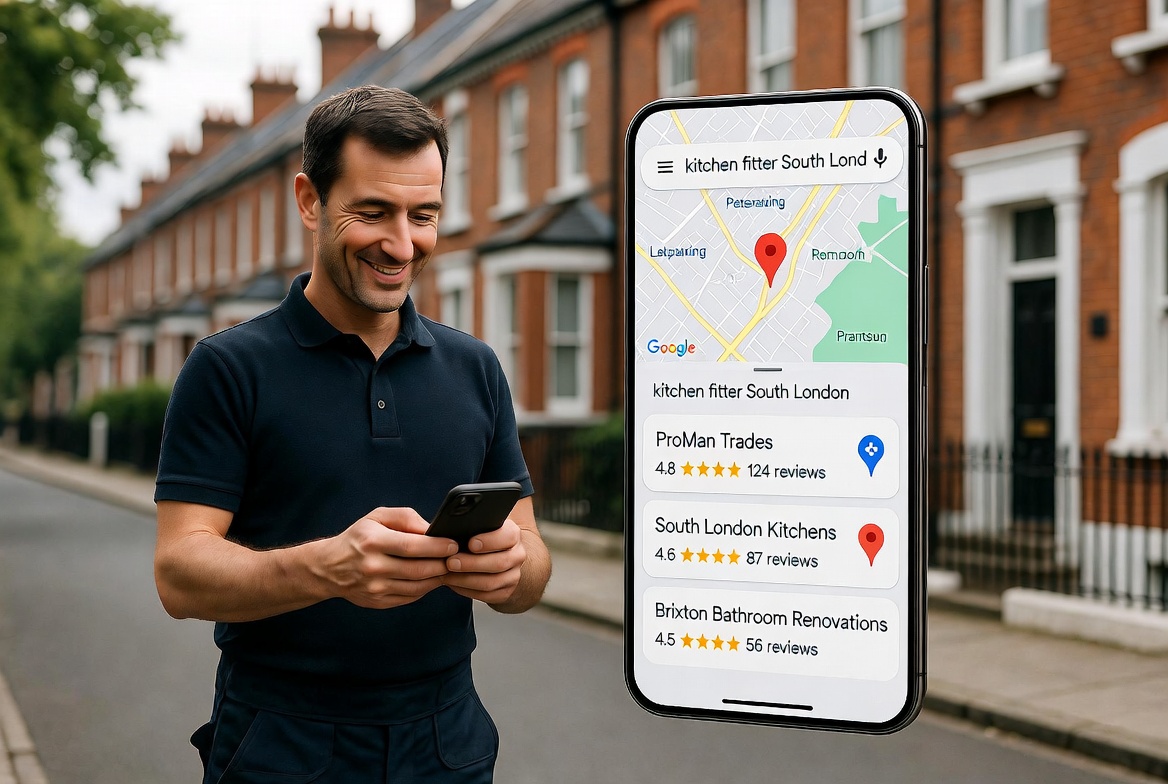
If you're a builder, kitchen fitter or home improvement specialist in South London, there's a good chance you're missing out on a stream of local enquiries every single week — not because your business isn't good enough, but because it's not showing up where homeowners are looking.
Google Maps has become the first stop for most people searching for a local tradesperson. Before they visit a website, before they ask a friend, they open Google, type what they need, and look at the map. The three businesses that appear in what Google calls the 'Local Pack' — the map results that show up before the regular search results — get the vast majority of clicks and calls.
If you're not in that Local Pack, you're invisible to a huge number of potential clients. Here's exactly how to change that.
What is Google Maps optimisation and why does it matter?
When someone in Clapham types 'builder near me' or 'kitchen fitter South London' into Google, two sets of results appear. The first is the Local Pack — a map with three business listings showing ratings, location and contact details. The second is the regular organic search results below it.
The Local Pack gets clicked first, trusted more and converted at a significantly higher rate than organic results. For a trades business operating in a defined geographic area, showing up in those three spots is one of the most valuable things you can achieve online.
The good news is that getting there doesn't require a big budget. It requires a well-optimised Google Business Profile — and most of your competitors haven't done this properly.
Step 1 — Claim and verify your Google Business Profile
If you haven't already, go to business.google.com and either claim your existing listing or create a new one. Google will send a verification code to your business address — enter it to confirm you own the listing.
This is the foundation of everything else. Without a verified profile, none of the steps below will work.
Step 2 — Complete every single field
Most trades businesses claim their profile and then leave it half empty. This is a significant missed opportunity. Go through every field and fill it in completely:
- Business name — use your real trading name, nothing else
- Category — choose the most specific primary category available (e.g. 'Kitchen Fitter' not just 'Contractor')
- Address — your registered business address
- Phone number — a local number performs better than a mobile only
- Website — link directly to your homepage or your most relevant service page
- Opening hours — keep these accurate and up to date
- Service areas — list every South London borough you work in
- Services — add each individual service you offer
- Description — write 2–3 sentences explaining what you do, where you work and what makes you different. Include the words 'South London' and your main trade naturally.
Google rewards completeness. The more fields you fill in, the more signals you give Google that your business is legitimate, active and relevant.
Step 3 — Add photos — lots of them
Profiles with photos receive significantly more clicks than those without. For a trades business, photos do double duty: they signal to Google that your profile is active, and they signal to homeowners that your work is worth looking at.
Add at least 10 photos to start with, including finished project photos — before and after where possible, your team on site, your van or signage if you have it, and the areas of South London you work in.
Update your photos regularly. Google notices activity and rewards profiles that are kept fresh.
Step 4 — Get Google reviews and respond to every one
Reviews are one of the strongest ranking signals Google uses for local search. More reviews, higher average rating, and recent reviews all push your profile higher in the Local Pack.
The most effective way to get reviews is simply to ask. After every job, send your client a direct link to your Google review page — via WhatsApp, text or email. Most happy clients will leave one if you make it genuinely easy.
A simple message works perfectly: 'Really glad you're happy with the work — if you have two minutes, a Google review would mean the world to us. Here's the link: [your Google review link]'
Aim for a minimum of 20 reviews before expecting to rank competitively in South London. And respond to every review — positive or negative. Responding shows Google and potential clients that you're an active, engaged business owner.
Step 5 — Post updates regularly
Google Business Profile has a posts feature that most trades businesses completely ignore. You can post updates, project photos, offers and news directly to your profile — and Google treats this activity as a signal that your business is current and relevant.
Post at least once a fortnight. It doesn't need to be elaborate. A photo of a completed kitchen with a short description of the job and the area it was in is perfect. Something like: 'Finished this full kitchen installation in Dulwich last week — new layout, integrated appliances and custom island. Really happy with how it came out.'
This kind of post reinforces your geographic relevance for South London searches and gives potential clients more evidence of your work.
Step 6 — Make sure your website backs up your profile
Google cross-references your Business Profile with your website. If your website mentions the same service areas, the same business name and the same phone number, it strengthens your profile's authority.
Make sure your website footer includes your business name, address and phone number exactly as they appear on your Google Business Profile. And make sure your website mentions the South London areas you serve — not just in passing, but clearly in your page headings and body copy.
How long does it take to see results?
For businesses starting from scratch, you can expect to see meaningful movement in your Google Maps ranking within 4–8 weeks of completing all the steps above — assuming you're consistently gathering reviews and posting updates.
In less competitive South London boroughs, some businesses see results faster. In more competitive areas like Clapham or Brixton, it may take a little longer — but the fundamentals are the same.
The businesses that show up consistently are the ones that treat their Google Business Profile as a living part of their business, not a one-time setup task.
If you'd rather not do this yourself
Google Business Profile optimisation is one of the core services we offer at OM Marketing. We set it up properly, keep it active and make sure it's working in concert with your website and reviews strategy — so you're showing up when South London homeowners are searching for your trade.
If you'd like to know exactly where your profile stands right now, book a free 20-minute online presence audit. We'll look at your Google listing, your website and your reviews and tell you exactly what's costing you enquiries.
Find out exactly where your Google presence stands.
Book a free 20-minute online presence audit — we'll review your Google Business Profile, website and reviews and tell you exactly what to fix to start showing up in South London searches.